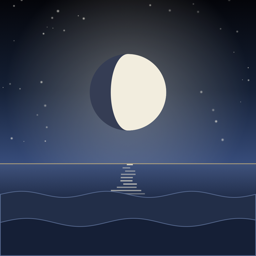
Nocturnal
Nocturnal draws tonight's sky over a paper horizon of open sea or rolling hills. The moon hangs at its real height and direction, lit on the side facing the sun. Below it are today's sunset and every sun and moon event of the day: twilight, golden hour, blue hour, moonrise, and moonset.
Common questions
How do I switch between sea and hills? Swipe across the sky, or tap Sea or Hills under it.
Why does it need my location? Sunrise, sunset, and the moon's position all depend on where you stand. Nocturnal computes them on your iPhone. Your location is never sent anywhere.
How do I add the widget? On the Home Screen, touch and hold an empty spot, tap Edit, then Add Widget, and choose Nocturnal. For the Lock Screen, touch and hold the Lock Screen, tap Customize, then the widget area under the clock.
The widget says "Open Nocturnal." Open the app once so it can find where you are; the widget uses the same place.
How accurate are the times? Sun and moon times are checked against the US Naval Observatory to within a minute.
The sky is still with Reduce Motion on. That's on purpose: Nocturnal holds one complete frame and updates it each minute.
Contact
Questions, bugs, or ideas: support@atharux.com.